I Tried Out Cloudflare After Hearing So Much About It
- This article contains affiliate links -

This post is about my experience getting a custom domain for this blog through Cloudflare Registrar. I compared six registrars side by side and chose it because it doesn’t add its own markup to renewal fees and keeps WHOIS contact information hidden by default. After buying the domain, I set up DNS and connected it to the site, all within the same dashboard.
In my case, I’d already decided to host the site on Cloudflare Pages, so buying the domain there too was convenient and felt straightforward.
* Information as of September 2026.
I compared six registrars and looked at pricing from year two on
Before buying the domain, I did a side-by-side comparison of six registrars that offer .com domains. In addition to Cloudflare Registrar, I looked at five Japanese registrars: Xserver Domain, Muumuu Domain, Onamae.com, Value Domain, and Star Domain. I checked four things: registration fees, renewal fees, whether WHOIS privacy protection was free, and any caveats about signing up.
What I learned from comparing them was that a low first-year price and the price from year two on are two different things. When I checked each company’s information at the end of August, several offered a free or heavily discounted first year before moving up to the regular price in year two. Some also added a variable adjustment fee later, on top of the listed price. I also came across warnings that some registrars might have web hosting options preselected on the sign-up screen. I decided to compare prices from year two on, rather than first-year prices.

According to the official information, Cloudflare Registrar sells domains at cost, with no markup on wholesale prices, and follows the same policy for renewals. When I compared prices from the end of August, the math showed that the longer I kept the domain, the wider the cost gap would get. From what I could confirm, payment was by card in U.S. dollars, and the interface was in English. I settled on this registrar at the end of August. On my checkout screen, the auto-renewal toggle was off, and I noticed that before clicking the purchase button.
I ran a WHOIS lookup myself to see what was visible

The checkout screen had fields asking for accurate contact information, including my name and address. Registrant information is required to register a domain, and the system is built on the premise that anyone can look it up through WHOIS. Still, many registrars offer proxy or redaction features so personal information isn’t displayed as-is. What I was concerned about was whether that protection was something I had to enable by checking a box during sign-up. With Cloudflare Registrar, it was on from the start, so I appreciated not having to worry about forgetting to enable it.
The official documentation also says that contact information is hidden by default, and I didn’t see any steps for turning it on. Right after the purchase was complete, I ran an external WHOIS lookup on my own domain to check whether that was really the case.
In the results, the name, address, and postal code fields were all marked as redacted, and the email address field was blank. About all that was publicly visible was the country and region, the registration and expiration dates, and the nameserver names. The phone number shown wasn’t mine either; it was a contact number for the registrar.
That output let me confirm which details were hidden.
I set up DNS and connected the domain in the same dashboard

Once the purchase was complete, I could go straight on to DNS setup from the same account dashboard. The nameservers were already set to Cloudflare’s. That completely eliminated the nameserver switch I’d been planning to make if I bought the domain from another registrar. The official documentation says domains registered with Cloudflare Registrar are locked to Cloudflare’s nameservers. I was planning to host the site there too, so I went ahead on those terms.
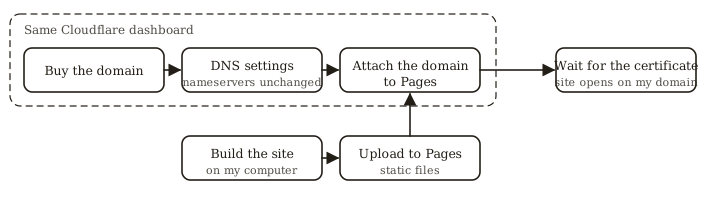
That same day, I built the starter site I’d created with Astro and uploaded it to Cloudflare Pages, then connected this domain from the Pages dashboard. The necessary DNS records were added to the same zone automatically, and after waiting for the certificate to be issued, I could open the site at my own domain. I handled everything from the purchase to this point with just the same dashboard in my browser and my local terminal. For a while after the site went live, I couldn’t access it from my own connection, but it was visible from elsewhere, so I left the settings alone.
Wrapping up
For my custom domain, I made my choice based not on a low first-year price, but on renewal fees from year two on and how WHOIS was handled. According to the official information, Cloudflare Registrar prices renewals at cost. I confirmed that my contact information was hidden by running a WHOIS lookup myself. With that, the blog’s foundation was in place, and I ended the day with an “under maintenance” page up.